MENSARA.AI · A GOVERNED MIND, IN YOUR ACCOUNT

Set safe boundaries · GUIDE 09

Know what an assistant may read or change

Reading a note, suggesting a correction, and approving a change are separate permissions.
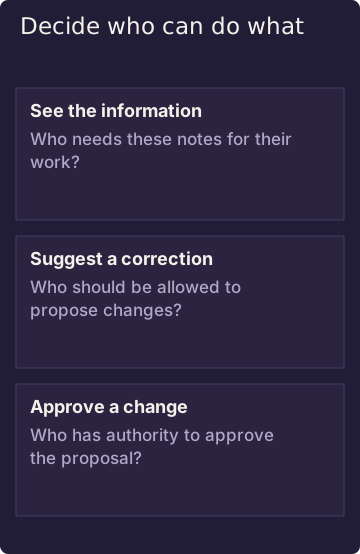
Decide who can do what

These are separate permissions. Seeing a note does not automatically allow someone to change or approve it.

Diagram in words: See the information. Who needs these notes for their work? Suggest a correction. Who should be allowed to propose changes? Approve a change. Who has authority to approve the proposal?

A familiar situation

An assistant may be allowed to read account notes so it can prepare for a meeting. That does not let it read payroll information, suggest a change to every note, approve its own suggestion, or act as the owner.

If a request is refused, ask the owner for access to the specific notes needed. A refusal is a boundary; it does not tell you whether hidden material exists.

When a note needs fixing

First, read the note the assistant is allowed to see and confirm the correction from a reliable source. A check before submitting a suggestion can catch an out-of-date edit, but it does not change the note and it does not prove the correction is accurate.

After a suggestion is submitted, check whether it is waiting for review or has changed the note. Held means it is waiting for the next required step; the source has not changed. Applied means the change was made.

Check the source and the proposed correction when the decision matters.

Related

Ask what is current, then ask why

NEXT GUIDE · 10 Decide where your information may go Before you use Mensara for work that matters, decide where your notes may be stored, which connected AI or service providers may receive them, and who operates the systems involved. The answer depends on the configuration you choose. →

MENSARA.AI · KNOW WHAT AN ASSISTANT MAY READ OR CHANGE · AGENT VIEW · TEXT/MARKDOWN

# Read and proposal procedure

Discover the authenticated principal and reachable zones first. Read checks principal and granted target before content. A generic authorization denial is a stopping condition; do not reveal or infer target content.

`propose_write` requires propose scope and evaluates both propose and read grants. Read authority alone is insufficient. Use `check_write` before a proposed edit when authorized: it lands no proposed content but can emit a receipt. `ok=true, verdict=fail` means the dry run completed with a failure.

**Template only — use an actual permitted target, current revision, and zone contract.**

```
change = {"path":"<permitted target>","op":"edit","anchor":"<existing heading>","mode":"replace_section","content":"<replacement section>","base_sha":"<verified current revision>"}
check_write({"changes":[change]})
If the check actually passes and this edit is authorized, propose_write({"changes":[change],"rationale":"<reason for change>"})
```

Stop on denial or stale-base. A structural rejection is `ok=false` with its specific reason where supplied; it differs from generic denial. On admission, inspect `proposal_id`, `status`, `branch`, and files. `held` is pending disposition, potentially with degraded bookkeeping fields. `applied` is reported only when governed inline policy returns that status and a commit when present. For an unknown outcome, inspect existing proposal state before considering retry; no broad idempotency guarantee is established.

Captured synthetic in-process fixtures observed a stale check as `ok=true, verdict=fail, reason=stale-base` and a proposal as `ok=true, status=held` with `proposal_id` and `branch`. They are not MCP transport outputs and do not demonstrate approval.

The edit template is incomplete until a valid base token is available. The write gate accepts the target's Git HEAD blob token, or an authorized memory entry's SHA-256 revision. An ordinary read is not shown to return a base token. Do not invent one, hash arbitrary served content, or treat every content hash as interchangeable. Token acquisition for an ordinary account-note edit remains an unverified setup step.

Report `queue_bridge=failed` or `receipt=pending` when present: a held record alone does not prove it is visible to the reviewer or fully receipted. Do not resubmit a landed proposal to repair bookkeeping. On an unknown write outcome, inspect the existing proposal state before considering a retry.

## A tested create, without a base-token assumption

The following arguments were passed to the released Gateway in a temporary synthetic Mind with read and propose scope for `notes`. They are **not a complete MCP client transcript** and `notes` is a fixture path, not a customer default.

```json
{"changes":[{"op":"create","path":"notes/new.md","content":"---\ntitle: Synthetic account update\n---\nThe next check-in is Tuesday.\n"}]}
```

The fixture's `check_write` returned a passing verdict. A separate `propose_write` with those same changes and rationale `Synthetic documentation test` returned `status=held`. The new file was absent from the current working tree afterward. This demonstrates a held create, not an approved edit or an applied customer change.

For a stale change, the operation matters: `check_write` can return `ok=true`, `verdict=fail`, `reason=stale-base`; a rejected `propose_write` uses `ok=false` and `error=stale-base`. Neither is a held proposal.

## Continue

[Current memory and evidence](/how-it-works/current-and-evidence)

[Generated tool input reference](/how-it-works/tool-inputs.md)